

I Claimed My GBP — What to Do Next
Claiming a Google Business Profile is just the beginning. For small business owners, plumbers, and service companies in Angleton, Lake Jackson, Pearland, and Alvin, the real work starts once you get verified.
The businesses that turn a claimed GBP into a steady stream of calls, direction requests, and booked jobs are the ones that treat it like a local storefront, not a one-time checkbox. Every section of your profile—business hours, photos, review responses—either builds trust with local customers or quietly nudges them toward a competitor.

This guide covers what to do after claiming a GBP: locking down ownership, cleaning up business info, optimizing your profile, setting up review workflows, building a local SEO plan, and tracking performance. The focus is on what actually works in competitive local markets in 2026—not just generic tips. If you want to talk strategy, reach out to SEO My Website Guru in Brazoria County at (979) 487-3296 or seomywebsite.guru/contact-us.
Key Takeaways
- Secure ownership, clean up business information, and build trust signals right after claiming your Google Business Profile.
- Google Maps is your digital storefront for local service businesses—every profile detail either earns calls or loses them.
- Track real performance data, not just vanity metrics, to decide whether to keep optimizing yourself or bring in expert help.
Confirm Ownership and Lock Down Access

Before you touch anything else, make sure the right people have the right access to your Google Business Profile. Too often, leftover agency accounts or old employees slow down businesses trying to improve their Google Maps presence.
Check Google Business Profile Ownership and User Roles
Log in to the GBP dashboard and go to the "Users" or "People" section. Everyone listed there has some level of control.
Google Business Profile offers three roles:
- Owner: can manage all settings, add or remove users, and delete the profile.
- Manager: can edit most business info and respond to reviews.
- Site Manager: has limited editing access.
The business owner or a trusted decision-maker should always be the primary owner. If you work with an agency or contractor, manager access is usually enough. Using a business domain email to claim and verify a listing keeps long-term control in the right hands ( Moz's guide explains this well).
Review the GBP Dashboard for Warnings or Missing Verification
Look for alerts, warnings, or any pending verification steps. Sometimes, you’ll see a "Not verified" status even after claiming, especially if Google needs a manual review or if the postcard expired.
If instant verification wasn’t available, you might need to verify by phone, email, text, or even a video call. Businesses that verify their website through Google Search Console may get automatic GBP verification ( Backlinko's guide has the details).
What to Do if a Former Employee or Agency Still Has Access
This happens all the time. Maybe a past marketing agency, an old office manager, or even a former partner still has owner-level access. If they do, they can edit info, respond to reviews, or even remove the current owner.
To fix this, go to the users list and remove anyone who doesn’t need access. If someone outside your business holds the owner role, request ownership through Google. Google gives the current owner three days to respond. If they don’t, your request moves forward.
When to Contact Google Business Profile Support
Contact Google Business Profile support if:
- Your ownership request gets denied, even though you have proof you own the business.
- The listing says "This business has been claimed," but no one in your organization has access.
- Verification keeps failing, or your profile is stuck as "suspended."
Gather documentation like utility bills, business registration, and a business domain email. Sometimes Google will escalate your case for manual review. The sooner you lock down ownership, the sooner you can really get to work.
Fix the Core Business Information First

Accurate business information is the foundation of local search rankings. Google relies on your name, address, phone number, categories, and service areas to match your listing to nearby searches. Even small errors here can quietly tank your visibility.
Set Accurate NAP, Categories, and Service Areas
NAP means Name, Address, Phone number. These three fields need to match exactly what’s on your website, directory listings, and anywhere else online.
Categories are more important than people think. The primary category tells Google what you do and affects which searches trigger your listing. If you’re a plumber in Brazoria County, pick "Plumber" as your primary category, then add secondary categories like "Water Heater Installation Service" or "Drain Cleaning Service."
Service areas define where you work. If you travel to customers, list specific cities and ZIP codes instead of a vague radius. Include places like Angleton, Pearland, Lake Jackson, and Alvin if you serve them.
Update Business Hours, Holiday Hours, and Contact Details
Incorrect hours are a fast way to lose customers. If someone shows up and you’re closed, or calls outside your listed hours, they lose trust.
Update your regular hours, and set holiday hours before every big holiday. Google sometimes prompts you, but don’t count on it. Add a direct phone number that someone answers, and make sure your website URL is correct.
Match Your Website and Listings to the Profile
Your business name, address, phone number, and website URL on GBP must match what’s on your homepage and other directories. Google cross-checks this info.
Inconsistencies—even little things like "St." vs. "Street" or different phone numbers—can hurt your rankings. Citation accuracy matters. If you’re on Yelp, Angi, BBB, or industry directories, make your NAP data identical everywhere.
Avoid Duplicate Listings and Inconsistent Business Information
Duplicate Google Business Profiles confuse Google and split your ranking signals. This usually happens after a move, a name change, or when someone accidentally creates a second listing.
Search Google Maps for your business name and address to spot duplicates. If you find one, Google has a process to merge or remove extra listings. Keep the profile with more reviews and history—delete the other.
Build the Profile Elements That Drive Calls and Trust
A complete Google Business Profile does more than sit there. It turns searchers into callers, direction requests, and website clicks. The right profile elements are what separate listings that generate leads from those that get ignored.
Write a Strong Business Description and Service List
The business description lets you use up to 750 characters. Use that space to say what you do, where you work, and why you’re a good choice. Skip the keyword stuffing. Write for real people, not robots.
The services section lets you list out what you offer, with descriptions and optional pricing. For plumbers, that might be "Slab Leak Detection," "Water Heater Replacement," or "Sewer Line Repair." Filling out the services list helps Google know what searches you’re relevant for ( Semrush's guide covers this).
Add Photos, Jobsite Proof, and Real-World Service Signals
Profiles with photos get way more engagement. Google’s own data (see Backlinko) says users are 70% more likely to visit a business with a completed profile.
Upload photos that actually show your work:
- Before-and-after shots of jobs
- Team members in uniform or on-site
- Service vehicles, equipment, finished jobs
- Your office or shop front, if you have one
Skip the stock photos. Real images build trust and show Google you’re active.
Use Google Posts for Updates, Offers, and Seasonal Jobs
Google Posts show up right on your profile in Search and Maps. They’re free and let you highlight seasonal offers, finished projects, service announcements, or community events.
A plumber might post about water heater specials before winter, share tips for preventing frozen pipes, or announce service in a new city. Try to post at least once or twice a week. Each post sticks around for about seven days.
Turn Customer Engagement Into More Leads
The Q\&A section lets anyone ask and answer questions. Keep an eye on it and answer clearly before someone else does.
If you can respond quickly, enable messaging. Add booking links or contact forms if you’ve got them. Every little feature that makes it easier for someone to call or book helps your profile convert better.
Set Up Reviews and Response Workflows
Customer reviews are huge for local SEO and trust. A profile with lots of recent, positive reviews outperforms one that looks neglected—in both search results and conversion rate.
Ask for Reviews the Right Way After Completed Jobs
The best time to ask for a review is right after you finish a job and the customer’s happy. Make it easy:
- Send a direct link to the Google review form by text or email.
- Ask in person at the end of the visit.
- Put the review link on invoices or follow-ups.
Don’t offer incentives for reviews. Google doesn’t allow it, and you risk suspension. Aim for a steady, natural flow of feedback. As Widewail points out, consistency matters more than getting a bunch all at once.
Respond to Customer Reviews to Improve Trust and Conversion
Respond to every review, good or bad. This shows Google and future customers that you’re engaged and care. Regular, thoughtful responses can even boost your local SEO ( Clickify's analysis digs into this).
Keep your replies professional and specific. Thank the reviewer, mention the service if it fits, and avoid generic copy-paste responses. A personal reply to a five-star review builds trust. A thoughtful answer to a three-star review might even win a customer back.
Handle Negative Feedback Without Damaging the Listing
Negative reviews are just part of running a business. What you do next matters way more than the review itself.
Stay calm. Acknowledge the concern, and offer to resolve the issue offline.
Never argue publicly or share private customer details. If a review breaks Google's policies—think spam, fake, or totally off-topic—flag it in the GBP dashboard for Google's review moderation process.
Honestly, a thoughtful response can impress future customers more than the review scares them off.
Use Review Trends to Guide Service and Marketing Decisions
Over time, reviews start to show patterns. If several people mention fast response times, make that a selling point in Google Posts and on your website.
If lots of reviews talk about something specific, like "emergency drain clearing," then it might be time to create a dedicated service page for it.
Reviews can also point out blind spots. If you see repeated complaints about scheduling or pricing, that's valuable feedback.
Connect GBP to Local SEO and Your Website
Your Google Business Profile doesn't stand alone. Its performance depends on the bigger local SEO picture: the website you link to, the citations out there, and the signals Google finds across the web.
This is where you see the gap between a claimed profile and one that's actually working for you.
Why Google Maps Functions Like a Service Business Storefront
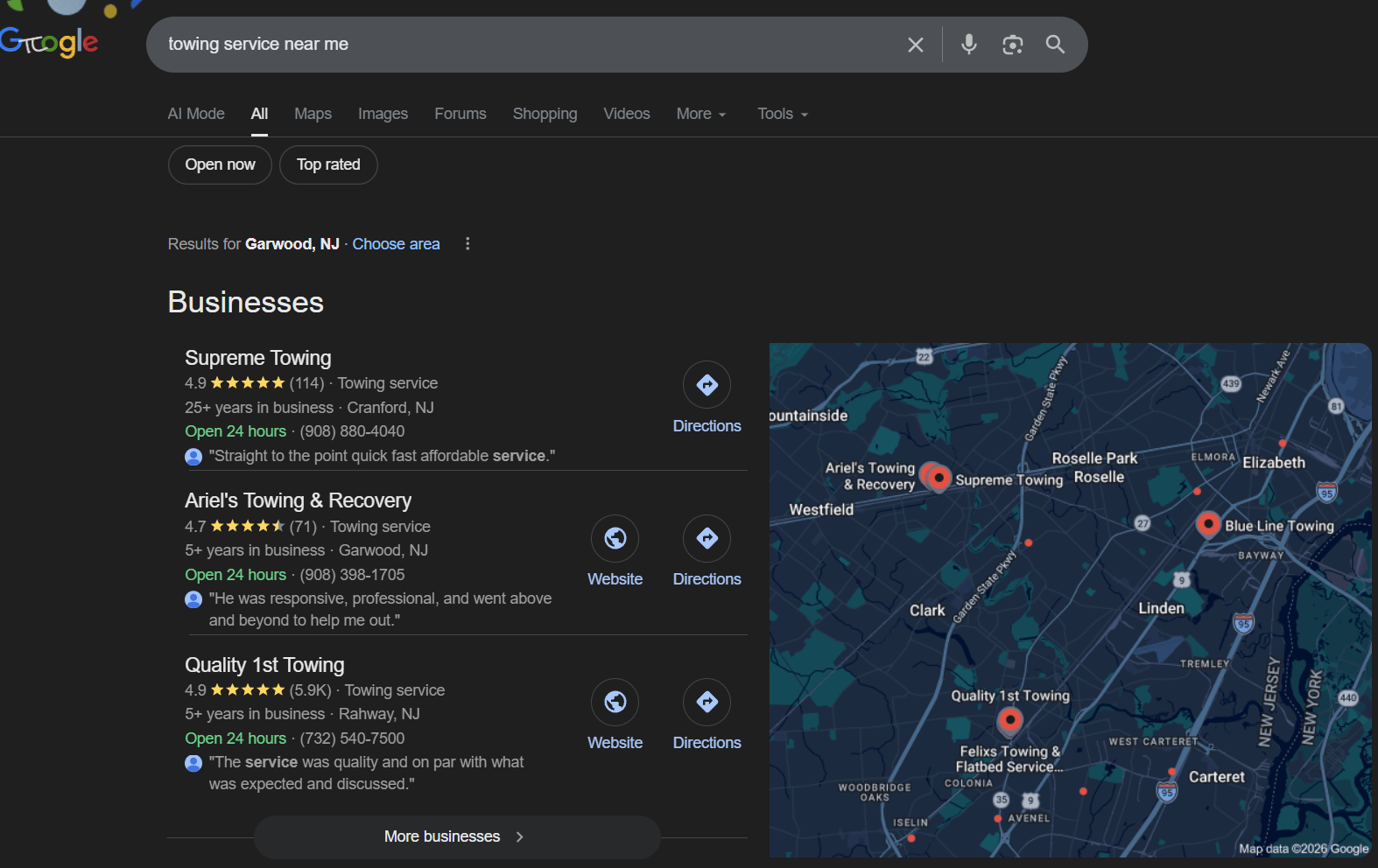
For a plumber in Brazoria County, Google Maps is often the first time a potential customer sees the business. If someone searches "plumber near me" in Pearland or Lake Jackson, the Map Pack appears before they even reach regular website links.
Google Maps is the 2026 storefront for local service businesses. The GBP listing is your window display; the website is where the sale happens.
Both need to work together. If your listing sends people to a slow or outdated site, you waste the visibility local SEO brings you.
Build Service Pages That Support Nearby Rankings
Each main service deserves its own page on your website. A plumbing company should have separate, clear pages for things like water heater repair, sewer line replacement, and drain cleaning.
Don't just cram everything onto a single "Services" page—break it out.
These pages should include:
- The service name in the title tag and H1
- Relevant city and area names (Angleton, Alvin, Manvel, etc.)
- Clear calls to action, like a phone number or contact form
- Schema markup to help Google understand your services and area
This setup gives Google specific, crawlable content that matches local searches.
Strengthen Local SEO With Citation Accuracy and Area Relevance
Citations are just mentions of your business's name, address, and phone number on other sites. Think directories, industry listings, chamber pages, and local business sites.
Keep your citation data consistent. When it's off, Google gets confused.
Professional local SEO, like what SEO My Website Guru does, goes further with trade area geo-grid analysis, drive-time mapping, and competitor reverse engineering to spot gaps and opportunities.
Align Conversion-Focused Web Design With Search Intent
If your website ranks well but doesn't turn visitors into calls or jobs, you're missing out. Conversion-focused web design means:
- Fast load times, especially on mobile
- A clickable phone number on every page
- Service descriptions written for real people, not just search engines
- Trust signals—reviews, certifications, real photos
When design and SEO work together from the start, your website helps you rank and actually bring in business. That's why SEO My Website Guru builds sites as sales tools, not just digital brochures.
Track Performance and Decide What to Improve Next
Guessing doesn't cut it. The GBP dashboard, Google Search Console, and website analytics together show what's working, what's flat, and where you can improve.
Watch Calls, Direction Requests, Clicks, and Keyword Footprint
The GBP dashboard highlights the big interactions: how many people called, asked for directions, clicked to your site, or viewed your profile. These are your best signals that the profile is actually driving business.
Track your keyword footprint too. Google shows which search terms triggered your profile to appear.
If you see more relevant queries like "emergency plumber Angleton" or "water heater repair Lake Jackson," your profile's gaining ground. If the list isn't growing, something's off.
Semrush recommends reviewing these numbers at least monthly to spot if your changes are paying off.
Use Search Console and Analytics to Spot Real Gains
Google Search Console shows how your website performs in organic search: impressions, clicks, average position, and which queries bring in traffic.
This data fills in the gaps from the GBP dashboard, showing if your site is pulling its weight.
Google Analytics (or GA4) tracks what visitors do once they land. Watch for:
- Phone call clicks from mobile
- Contact form submissions
- Pages with high bounce rates (maybe they need work)
- Traffic coming from Google Maps
When you look at all these tools together, you get the full story from search to customer action.
Know When DIY Is Enough and When Expert Help Makes Sense
Small business owners can handle a lot of GBP basics: updating hours, adding photos, replying to reviews, posting updates. You don't need a marketing degree for those.
But it makes sense to get help when:
- Your rankings won't budge, even with steady effort.
- Competitors are dominating the Map Pack.
- You just don't have time to keep up with weekly optimizations.
- You need technical work like schema markup, citation cleanup, or geo-grid analysis.
SEO My Website Guru offers transparent reporting and a 30-Day Results Guarantee, so it's easier to see if pro local SEO is actually paying off. Look for real gains—like more visibility in Search Console, a bigger keyword footprint, or more GBP actions (calls, directions)—to set a clear benchmark.
Prioritize the Highest-ROI Moves in Competitive Local Markets
Not every optimization is worth the same. In a tough market like Brazoria County, the biggest wins usually come in this order:
- Fix your business info and verify ownership. Get the basics right first.
- Earn steady, recent reviews. Both volume and recency count.
- Build service-specific, local web pages. These help with organic and Map Pack rankings.
- Keep your citations accurate everywhere. Inconsistencies quietly hurt you.
- Post regularly and keep your profile active. An active profile shows you're open for business.
Spend your time and budget on the top items before chasing fancy tactics. You'll see results faster—and with less headache.
Frequently Asked Questions
How do I verify my business profile after claiming it?
After claiming, Google gives you a verification option—could be phone, text, email, video call, or postcard. Follow the prompts in the GBP dashboard and enter the code when it arrives.
If your website's already verified through Google Search Console, you might get instant verification.
Where do I log in to manage my Google Business Profile?
Go to business.google.com and log in with the Google account you used to claim the profile.
From there, the GBP dashboard lets you edit info, respond to reviews, post updates, and check your performance data.
How long does it take for my claimed profile changes to appear on Google Search and Maps?
Most changes show up in a few minutes to 48 hours. Some edits—like name, address, or category—might need a manual review and could take a few days.
If changes are not visible after a week, check the dashboard for any rejection notices or pending alerts.
How do I add or edit my business location on Google Maps?
In the GBP dashboard, head to "Info" or "Business information" and update your address. If you serve customers at their locations, choose the service-area option and list cities or ZIP codes instead.
Google might re-verify your listing if you make a big address change.
What information should I complete first to optimize my business profile?
Start with the basics: NAP (name, address, phone), categories, service areas, hours, and website URL. Then add a business description, full services list, and photos.
Google says users are 70% more likely to visit a business with a complete profile—so it's worth the effort.
How do I request reinstatement if my business profile gets suspended?
Head over to the GBP dashboard and check for a "Request reinstatement" or "Appeal" button. You'll need to upload documents that prove your business is legitimate and follows Google's rules.
Usually, that's something like a utility bill, your business license, or registration paperwork. If Google denies your first appeal, try reaching out to Google Business Profile support and send in more proof.
Honestly, reviews might wrap up in just a few days, or they could drag on for several weeks. It can feel like a bit of a waiting game.
I Claimed My GBP — What to Do Next
Claiming a Google Business Profile is just the beginning. For small business owners, plumbers, and service companies in Angleton, Lake Jackson, Pearland, and Alvin, the real work starts once you get verified.
The businesses that turn a claimed GBP into a steady stream of calls, direction requests, and booked jobs are the ones that treat it like a local storefront, not a one-time checkbox. Every section of your profile—business hours, photos, review responses—either builds trust with local customers or quietly nudges them toward a competitor.
This guide covers what to do after claiming a GBP: locking down ownership, cleaning up business info, optimizing your profile, setting up review workflows, building a local SEO plan, and tracking performance. The focus is on what actually works in competitive local markets in 2026—not just generic tips. If you want to talk strategy, reach out to SEO My Website Guru in Brazoria County at (979) 487-3296 or seomywebsite.guru/contact-us.
Key Takeaways
- Secure ownership, clean up business information, and build trust signals right after claiming your Google Business Profile.
- Google Maps is your digital storefront for local service businesses—every profile detail either earns calls or loses them.
- Track real performance data, not just vanity metrics, to decide whether to keep optimizing yourself or bring in expert help.
Confirm Ownership and Lock Down Access
Before you touch anything else, make sure the right people have the right access to your Google Business Profile. Too often, leftover agency accounts or old employees slow down businesses trying to improve their Google Maps presence.
Check Google Business Profile Ownership and User Roles
Log in to the GBP dashboard and go to the "Users" or "People" section. Everyone listed there has some level of control.
Google Business Profile offers three roles:
- Owner: can manage all settings, add or remove users, and delete the profile.
- Manager: can edit most business info and respond to reviews.
- Site Manager: has limited editing access.
The business owner or a trusted decision-maker should always be the primary owner. If you work with an agency or contractor, manager access is usually enough. Using a business domain email to claim and verify a listing keeps long-term control in the right hands ( Moz's guide explains this well).
Review the GBP Dashboard for Warnings or Missing Verification
Look for alerts, warnings, or any pending verification steps. Sometimes, you’ll see a "Not verified" status even after claiming, especially if Google needs a manual review or if the postcard expired.
If instant verification wasn’t available, you might need to verify by phone, email, text, or even a video call. Businesses that verify their website through Google Search Console may get automatic GBP verification ( Backlinko's guide has the details).
What to Do if a Former Employee or Agency Still Has Access
This happens all the time. Maybe a past marketing agency, an old office manager, or even a former partner still has owner-level access. If they do, they can edit info, respond to reviews, or even remove the current owner.
To fix this, go to the users list and remove anyone who doesn’t need access. If someone outside your business holds the owner role, request ownership through Google. Google gives the current owner three days to respond. If they don’t, your request moves forward.
When to Contact Google Business Profile Support
Contact Google Business Profile support if:
- Your ownership request gets denied, even though you have proof you own the business.
- The listing says "This business has been claimed," but no one in your organization has access.
- Verification keeps failing, or your profile is stuck as "suspended."
Gather documentation like utility bills, business registration, and a business domain email. Sometimes Google will escalate your case for manual review. The sooner you lock down ownership, the sooner you can really get to work.
Fix the Core Business Information First
Accurate business information is the foundation of local search rankings. Google relies on your name, address, phone number, categories, and service areas to match your listing to nearby searches. Even small errors here can quietly tank your visibility.
Set Accurate NAP, Categories, and Service Areas
NAP means Name, Address, Phone number. These three fields need to match exactly what’s on your website, directory listings, and anywhere else online.
Categories are more important than people think. The primary category tells Google what you do and affects which searches trigger your listing. If you’re a plumber in Brazoria County, pick "Plumber" as your primary category, then add secondary categories like "Water Heater Installation Service" or "Drain Cleaning Service."
Service areas define where you work. If you travel to customers, list specific cities and ZIP codes instead of a vague radius. Include places like Angleton, Pearland, Lake Jackson, and Alvin if you serve them.
Update Business Hours, Holiday Hours, and Contact Details
Incorrect hours are a fast way to lose customers. If someone shows up and you’re closed, or calls outside your listed hours, they lose trust.
Update your regular hours, and set holiday hours before every big holiday. Google sometimes prompts you, but don’t count on it. Add a direct phone number that someone answers, and make sure your website URL is correct.
Match Your Website and Listings to the Profile
Your business name, address, phone number, and website URL on GBP must match what’s on your homepage and other directories. Google cross-checks this info.
Inconsistencies—even little things like "St." vs. "Street" or different phone numbers—can hurt your rankings. Citation accuracy matters. If you’re on Yelp, Angi, BBB, or industry directories, make your NAP data identical everywhere.
Avoid Duplicate Listings and Inconsistent Business Information
Duplicate Google Business Profiles confuse Google and split your ranking signals. This usually happens after a move, a name change, or when someone accidentally creates a second listing.
Search Google Maps for your business name and address to spot duplicates. If you find one, Google has a process to merge or remove extra listings. Keep the profile with more reviews and history—delete the other.
Build the Profile Elements That Drive Calls and Trust
A complete Google Business Profile does more than sit there. It turns searchers into callers, direction requests, and website clicks. The right profile elements are what separate listings that generate leads from those that get ignored.
Write a Strong Business Description and Service List
The business description lets you use up to 750 characters. Use that space to say what you do, where you work, and why you’re a good choice. Skip the keyword stuffing. Write for real people, not robots.
The services section lets you list out what you offer, with descriptions and optional pricing. For plumbers, that might be "Slab Leak Detection," "Water Heater Replacement," or "Sewer Line Repair." Filling out the services list helps Google know what searches you’re relevant for ( Semrush's guide covers this).
Add Photos, Jobsite Proof, and Real-World Service Signals
Profiles with photos get way more engagement. Google’s own data (see Backlinko) says users are 70% more likely to visit a business with a completed profile.
Upload photos that actually show your work:
- Before-and-after shots of jobs
- Team members in uniform or on-site
- Service vehicles, equipment, finished jobs
- Your office or shop front, if you have one
Skip the stock photos. Real images build trust and show Google you’re active.
Use Google Posts for Updates, Offers, and Seasonal Jobs
Google Posts show up right on your profile in Search and Maps. They’re free and let you highlight seasonal offers, finished projects, service announcements, or community events.
A plumber might post about water heater specials before winter, share tips for preventing frozen pipes, or announce service in a new city. Try to post at least once or twice a week. Each post sticks around for about seven days.
Turn Customer Engagement Into More Leads
The Q\&A section lets anyone ask and answer questions. Keep an eye on it and answer clearly before someone else does.
If you can respond quickly, enable messaging. Add booking links or contact forms if you’ve got them. Every little feature that makes it easier for someone to call or book helps your profile convert better.
Set Up Reviews and Response Workflows
Customer reviews are huge for local SEO and trust. A profile with lots of recent, positive reviews outperforms one that looks neglected—in both search results and conversion rate.
Ask for Reviews the Right Way After Completed Jobs
The best time to ask for a review is right after you finish a job and the customer’s happy. Make it easy:
- Send a direct link to the Google review form by text or email.
- Ask in person at the end of the visit.
- Put the review link on invoices or follow-ups.
Don’t offer incentives for reviews. Google doesn’t allow it, and you risk suspension. Aim for a steady, natural flow of feedback. As Widewail points out, consistency matters more than getting a bunch all at once.
Respond to Customer Reviews to Improve Trust and Conversion
Respond to every review, good or bad. This shows Google and future customers that you’re engaged and care. Regular, thoughtful responses can even boost your local SEO ( Clickify's analysis digs into this).
Keep your replies professional and specific. Thank the reviewer, mention the service if it fits, and avoid generic copy-paste responses. A personal reply to a five-star review builds trust. A thoughtful answer to a three-star review might even win a customer back.
Handle Negative Feedback Without Damaging the Listing
Negative reviews are just part of running a business. What you do next matters way more than the review itself.
Stay calm. Acknowledge the concern, and offer to resolve the issue offline.
Never argue publicly or share private customer details. If a review breaks Google's policies—think spam, fake, or totally off-topic—flag it in the GBP dashboard for Google's review moderation process.
Honestly, a thoughtful response can impress future customers more than the review scares them off.
Use Review Trends to Guide Service and Marketing Decisions
Over time, reviews start to show patterns. If several people mention fast response times, make that a selling point in Google Posts and on your website.
If lots of reviews talk about something specific, like "emergency drain clearing," then it might be time to create a dedicated service page for it.
Reviews can also point out blind spots. If you see repeated complaints about scheduling or pricing, that's valuable feedback.
Connect GBP to Local SEO and Your Website
Your Google Business Profile doesn't stand alone. Its performance depends on the bigger local SEO picture: the website you link to, the citations out there, and the signals Google finds across the web.
This is where you see the gap between a claimed profile and one that's actually working for you.
Why Google Maps Functions Like a Service Business Storefront
For a plumber in Brazoria County, Google Maps is often the first time a potential customer sees the business. If someone searches "plumber near me" in Pearland or Lake Jackson, the Map Pack appears before they even reach regular website links.
Google Maps is the 2026 storefront for local service businesses. The GBP listing is your window display; the website is where the sale happens.
Both need to work together. If your listing sends people to a slow or outdated site, you waste the visibility local SEO brings you.
Build Service Pages That Support Nearby Rankings
Each main service deserves its own page on your website. A plumbing company should have separate, clear pages for things like water heater repair, sewer line replacement, and drain cleaning.
Don't just cram everything onto a single "Services" page—break it out.
These pages should include:
- The service name in the title tag and H1
- Relevant city and area names (Angleton, Alvin, Manvel, etc.)
- Clear calls to action, like a phone number or contact form
- Schema markup to help Google understand your services and area
This setup gives Google specific, crawlable content that matches local searches.
Strengthen Local SEO With Citation Accuracy and Area Relevance
Citations are just mentions of your business's name, address, and phone number on other sites. Think directories, industry listings, chamber pages, and local business sites.
Keep your citation data consistent. When it's off, Google gets confused.
Professional local SEO, like what SEO My Website Guru does, goes further with trade area geo-grid analysis, drive-time mapping, and competitor reverse engineering to spot gaps and opportunities.
Align Conversion-Focused Web Design With Search Intent
If your website ranks well but doesn't turn visitors into calls or jobs, you're missing out. Conversion-focused web design means:
- Fast load times, especially on mobile
- A clickable phone number on every page
- Service descriptions written for real people, not just search engines
- Trust signals—reviews, certifications, real photos
When design and SEO work together from the start, your website helps you rank and actually bring in business. That's why SEO My Website Guru builds sites as sales tools, not just digital brochures.
Track Performance and Decide What to Improve Next
Guessing doesn't cut it. The GBP dashboard, Google Search Console, and website analytics together show what's working, what's flat, and where you can improve.
Watch Calls, Direction Requests, Clicks, and Keyword Footprint
The GBP dashboard highlights the big interactions: how many people called, asked for directions, clicked to your site, or viewed your profile. These are your best signals that the profile is actually driving business.
Track your keyword footprint too. Google shows which search terms triggered your profile to appear.
If you see more relevant queries like "emergency plumber Angleton" or "water heater repair Lake Jackson," your profile's gaining ground. If the list isn't growing, something's off.
Semrush recommends reviewing these numbers at least monthly to spot if your changes are paying off.
Use Search Console and Analytics to Spot Real Gains
Google Search Console shows how your website performs in organic search: impressions, clicks, average position, and which queries bring in traffic.
This data fills in the gaps from the GBP dashboard, showing if your site is pulling its weight.
Google Analytics (or GA4) tracks what visitors do once they land. Watch for:
- Phone call clicks from mobile
- Contact form submissions
- Pages with high bounce rates (maybe they need work)
- Traffic coming from Google Maps
When you look at all these tools together, you get the full story from search to customer action.
Know When DIY Is Enough and When Expert Help Makes Sense
Small business owners can handle a lot of GBP basics: updating hours, adding photos, replying to reviews, posting updates. You don't need a marketing degree for those.
But it makes sense to get help when:
- Your rankings won't budge, even with steady effort.
- Competitors are dominating the Map Pack.
- You just don't have time to keep up with weekly optimizations.
- You need technical work like schema markup, citation cleanup, or geo-grid analysis.
SEO My Website Guru offers transparent reporting and a 30-Day Results Guarantee, so it's easier to see if pro local SEO is actually paying off. Look for real gains—like more visibility in Search Console, a bigger keyword footprint, or more GBP actions (calls, directions)—to set a clear benchmark.
Prioritize the Highest-ROI Moves in Competitive Local Markets
Not every optimization is worth the same. In a tough market like Brazoria County, the biggest wins usually come in this order:
- Fix your business info and verify ownership. Get the basics right first.
- Earn steady, recent reviews. Both volume and recency count.
- Build service-specific, local web pages. These help with organic and Map Pack rankings.
- Keep your citations accurate everywhere. Inconsistencies quietly hurt you.
- Post regularly and keep your profile active. An active profile shows you're open for business.
Spend your time and budget on the top items before chasing fancy tactics. You'll see results faster—and with less headache.
Frequently Asked Questions
How do I verify my business profile after claiming it?
After claiming, Google gives you a verification option—could be phone, text, email, video call, or postcard. Follow the prompts in the GBP dashboard and enter the code when it arrives.
If your website's already verified through Google Search Console, you might get instant verification.
Where do I log in to manage my Google Business Profile?
Go to business.google.com and log in with the Google account you used to claim the profile.
From there, the GBP dashboard lets you edit info, respond to reviews, post updates, and check your performance data.
How long does it take for my claimed profile changes to appear on Google Search and Maps?
Most changes show up in a few minutes to 48 hours. Some edits—like name, address, or category—might need a manual review and could take a few days.
If changes are not visible after a week, check the dashboard for any rejection notices or pending alerts.
How do I add or edit my business location on Google Maps?
In the GBP dashboard, head to "Info" or "Business information" and update your address. If you serve customers at their locations, choose the service-area option and list cities or ZIP codes instead.
Google might re-verify your listing if you make a big address change.
What information should I complete first to optimize my business profile?
Start with the basics: NAP (name, address, phone), categories, service areas, hours, and website URL. Then add a business description, full services list, and photos.
Google says users are 70% more likely to visit a business with a complete profile—so it's worth the effort.
How do I request reinstatement if my business profile gets suspended?
Head over to the GBP dashboard and check for a "Request reinstatement" or "Appeal" button. You'll need to upload documents that prove your business is legitimate and follows Google's rules.
Usually, that's something like a utility bill, your business license, or registration paperwork. If Google denies your first appeal, try reaching out to Google Business Profile support and send in more proof.
Honestly, reviews might wrap up in just a few days, or they could drag on for several weeks. It can feel like a bit of a waiting game.